Showing posts with label mobile. Show all posts

Thursday, August 18, 2016

Download the Hottest mobile ringtones over the web

A website dedicated to hottest collection of ringtones. Download the best mobile ringtones. In any language. An ocean of mobile ringtones then why wait, Just click to enter the world of ringtones, ringtones and ringtones....

Click Below.
Laden Sie jetzt den heißesten Klingelton auf Ihr Handy!

or
Get the Hottest Ringtone on your mobile now!
Read More..

Saturday, April 30, 2016

Get your Orkut Friends Birthday reminder on your Mobile

This trick will help you setup a Birthday reminder for all your Orkut Friends on your Mobile using Google Calenders. Below are the few steps to do this:]
Step1:
Log on into your Orkut Account.
Step 2:
Now in a new tab, Go to Google .com
Step 3:
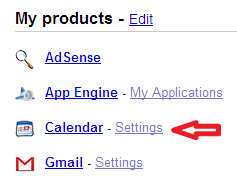
On the Top-Right end, you can see "My Account". Click on it.

Orkut Friends Birthday Reminder on your MobileStep 3:
Click on Calenders.
Orkut Friends Birthday Reminder on your MobileWhen you click on calenders, it will ask you to add orkut friends birthday to google calender. Accept it.

Step 4:
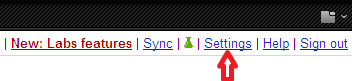
Now on the top-right end click on settings.

Orkut Friends Birthday Reminder on your MobileStep 5:
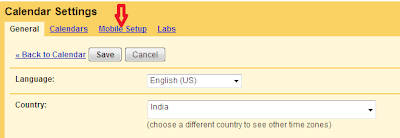
On this window, Click on Mobile Setup.

Orkut Friends Birthday Reminder on your Mobile
Step 6:
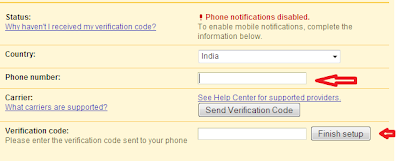
Now, Enter your mobile number in the space given and veryfy your Mobile Number.

Orkut Friends Birthday Reminder on your Mobile
Thats all, Now whenever there comes a birthday of your friend, you will get a reminder on your Mobile.
Read More..

Thursday, April 14, 2016

Gibbons Lecture Series Security in Mobile Devices

This Thursday evening Dr Giovanni Russello of Department of Computer Science of The University of Auckland will give a free public lecture on Security in Mobile Devices Giovanni Russello is a Senior Lecturer in the Department of Computer Science at The University of Auckland. He joined the department in 2012 from CREATE-NET in Trento, Italy, where he was the leader of the Security Group after completing a Post-Doctoral Fellowship at Imperial College London. Dr. Russello holds a PhD from Eindhoven University of Technology in the Netherlands and an MSc from the University of Catania in Italy. His research expertise is in the fast-evolving field of system security for both mobile and cloud platforms. He has authored or co-authored well over 50 research papers and books, and holds four provisional patents. His recent research has concentrated on developing novel security solutions to address vulnerabilities of mobile devices. The fruits of this research have now reached the commercialisation stage. Giovanni is the founder and CEO of Active Mobile Security, a start-up company funded by Uniservices, the universitys commercial arm.

When: 6pm for 6.30pm start, Thursday 8th May, 2014
Where: Owen G Glenn Building, Room OGGB3/260-092
Note that there is public parking in the basement of the Owen G Glenn Building at 12 Grafton Road.

Synopsis: Mobile devices such as smartphones and tablets have become exceedingly successful computing devices, exceeding personal computers in numbers of sales. Smartphones equipped with the Android operating system represent 82% of this very competitive world wide market. However, Android has become the top target for malicious code because the Android standard security mechanism has unique vulnerabilities. This lecture will discuss the special nature of security with mobile devices. In particular it will discuss problems with the Android security model and local research intended to help solve these issues.

from The Universal Machine http://universal-machine.blogspot.com/

IFTTT

Put the internet to work for you.

via Personal Recipe 895909

Read More..

Wednesday, February 24, 2016

Google Handwriting Input in 82 languages on your Android mobile device


Entering text on mobile devices is still considered inconvenient by many; touchscreen keyboards, although much improved over the years, require a lot of attention to hit the right buttons. Voice input is an option, but there are situations where it is not feasible, such as in a noisy environment or during a meeting. Using handwriting as an input method can allow for natural and intuitive input method for text entry which complements typing and speech input methods. However, until recently there have been many languages where enabling this functionality presented significant challenges.

Today we launched Google Handwriting Input, which lets users handwrite text on their Android mobile device as an additional input method for any Android app. Google Handwriting Input supports 82 languages in 20 distinct scripts, and works with both printed and cursive writing input with or without a stylus. Beyond text input, it also provides a fun way to enter hundreds of emojis by drawing them (simply press and hold the ‘enter’ button to switch modes). Google Handwriting Input works with or without an Internet connection.
By building on large-scale language modeling, robust multi-language OCR, and incorporating large-scale neural-networks and approximate nearest neighbor search for character classification, Google Handwriting Input supports languages that can be challenging to type on a virtual keyboard. For example, keyboards for ideographic languages (such as Chinese) are often based on a particular dialect of the language, but if a user does not know that dialect, they may be hard to use. Additionally, keyboards for complex script languages (like many South Asian languages) are less standardized and may be unfamiliar. Even for languages where virtual keyboards are more widely used (like English or Spanish), some users find that handwriting is more intuitive, faster, and generally more comfortable.
Writing Hello in Chinese, German, and Tamil.
Google Handwriting Input is the result of many years of research at Google. Initially, cloud based handwriting recognition supported the Translate Apps on Android and iOS, Mobile Search, and Google Input Tools (in Chrome, ChromeOS, Gmail and Docs, translate.google.com, and the Docs symbol picker). However, other products required recognizers to run directly on an Android device without an Internet connection. So we worked to make recognition models smaller and faster for use in Android handwriting input methods for Simplified and Traditional Chinese, Cantonese, and Hindi, as well as multi-language support in Gesture Search. Google Handwriting Input combines these efforts, allowing recognition both on-device and in the cloud (by tapping on the cloud icon) in any Android app.

You can install Google Handwriting Input from the Play Store here. More information and FAQs can be found here.
Read More..

Thursday, February 11, 2016

Use your mobile phone as webcam warelex S60 application

Turn your Symbian smartphone into a high-quality web camera and throw out your bulky USB webcam. Very simple to install and configure, Mobiola Web Camera consists of two software components: 1) a client application that resides on the phone, and 2) a webcam PC driver compatible with any Windows application that can receive video feeds from a web camera including Skype, Yahoo, MSN, AOL IM, ICQ messangers, www.YouTube.com, www.MySpace.com and www.grouper.com. Carry your webcam with you wherever you go and connect it to your laptop at anytime.

Download it here
Read More..

Monday, April 14, 2014

Mobile App Developers NYC Can Earn A Good Income

By Harriett Crosby


The iPhone has become one of the items of modern technology that everyone seems to want to own, and is useful for a large number of things, from communication to games. From the time Apple enabled others to create and sell their own applications, some entrepreneurs have created successful businesses. Mobile app developers NYC who have the relevant skills and some imagination can make some excellent money.

Two entrepreneurs who have already seen much success with their iPhone applications are Steve Demeter, who developed Trism, and Ethan Nicholas who developed iShoot. You can do the same if you have an imaginative idea for an application, and some skills in the necessary computer programming languages. You will also have to purchase some tools, such as Apple software.

To really make good money you will need to come up with an original idea. There are already thousands of applications available, and therefore you wont want to create something that is already in use. You can go online and do some research at apple.com to see the type of apps that have been developed, and the type of things that people want. There are also many categories, for example, family, games, education, social networking, sports etc.

It will be no use creating an application that nobody will buy, therefore you will have to do some market research. Talk to everyone you know who owns an iPhone and find out more about the apps they like and what new things they would purchase. Perhaps spend some time at higher education schools and find out what the students would like.

Your starting up costs may need to include a Mac computer. This computer will need to be able to handle the Leopard version of MacOS X, so that you can run the programs on it. The Apple software developer kit, or the SDK, will be another very worthy investment. The programming languages that you will need to know include Cocoa and Objective-C.

On the Apple developer website there is a lot of information that you will find useful. To have full access, you should sign up for an account with them. The iOS Reference Library is one of the resources that is available, and it has codes that can be copied or modified to suit various purposes. Guide books also contain details regarding many aspects of coding.

To make a successful iPhone application, you will need to be able to program in the various languages. These languages are taught at various colleges, but it is best if you have experience with programming in general before you start them. The courses offer different types of training, and last for a few weeks to a few months. Paying another developer to do the work is something else to consider.

Mobile app developers NYC should be carefully considered before hired. Find out if they can do the work efficiently, and how much they will charge. If a team of programmers is too expensive, then work with one or two people who have a good all-round knowledge. To launch your program, you will need a distribution certificate, and acceptance from the App Store.


About the Author:


Read More..
 
Copyright 2009 Information Blog
Powered By Blogger