Showing posts with label to. Show all posts

Saturday, October 29, 2016

Very easy to download youtube videos audio mp3 format


you can easily download youtube videos MP3 format
So we have a video from Youtube, download video format but do not format audio. Many mega bytes audio save you a good opportunities for those who want to download format. Assume whatever tips you know.
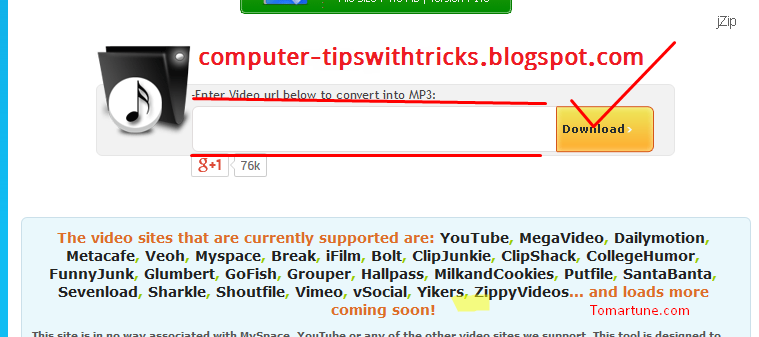
First go to this link Click to download youtube videos in mp3 format, you will see this picture shown bellow-


Then mark the red spot in the box and paste the link to your youtube video and then click download.
Then a few second you will verify the link and download will start automatically.  


Read More..

Friday, October 28, 2016

Syrias children learn to code with the Raspberry Pi

Three years ago, when I was looking for an example of social unrest to highlight the use of social media as a communication tool for protestors in my book, I chose the then new uprising in Syria. Im horrified the conflict still continues. However, I just came across a surprisingly good piece of news from that awful conflict; the use of the Raspberry Pi to teach Syrian refugees in Lebanon to code. Read the full article in the Guardian to learn more.

from The Universal Machine http://universal-machine.blogspot.com/

IFTTT

Put the internet to work for you.

Turn off or edit this Recipe

Read More..

Tuesday, October 25, 2016

Prevent access to specific partition or drive

Sometimes we would like to prevent users from accessing tons of data. we can do this by hiding the drive but it does not prevent the access completely. This trick will not hide the drive but users cannot access it. After preventing access, you can hide the drive to ensure full protection. To do this, perform the following steps:-

  • Log into the account where you want the users not to access the drive.
  • Open registry editor.
  • Go to HKEY_CURRENT_USER >> Software >> Microsoft >> Windows >> CurrentVersion >> Policies >> Explorer.
  • Right-click to create a new DWORD value with the name NoViewOnDrive.
  • Double-Click on this entry, Select the radio button named Decimal.
  • In the value data field put the value of the drive you want to prevent access.
  • The value is calculated using the formula 2n-1, where n is the number of the drive which you want to prevent access-1 for A, 2 for B, 3 for C and so on...
  • If you need to hide more than one drive, add the respective drive numbers and enter it into the value data field. For example, to hide drive C you need to enter 4 (2 3-1); to hide drives D and E you need to enter 24 (2 4-1 +2 5-1).
  • To apply the change to all users in the system, follow the same method, but use the key HKEY_LOCAL_MACHINE >> Software >> Microsoft >> Windows >> CurrentVersion >> Policies >> Explorer instead.
  • To remove all restrictions, just delete the entry.
  • To hide the drive click here.
Read More..

Monday, October 24, 2016

Summer Games Learn to Program


Looking for ways to engage your kids in constructive, meaningful learning? We’ve just launched Blockly Games, our next extension of Blockly, a web­-based graphical programming environment. As part of the generation of new programming environments that provide a more accessible introduction to coding, Blockly Games allows users to create and run programs by arranging blocks with a simple click, drag and drop.
Blockly Games requires little or no typing, which facilitates young or novice programmers to learn core coding principles in an intuitive way. By minimizing the use of syntax, users are able to focus on the logic and concepts used by computer scientists, progressing at their own pace as they venture through mazes and more advanced arenas.

Blockly was featured during the 2013 Computer Science Education week where people of all ages tried programming for the first time. Blockly is universally accessible with translations for a number of languages, including German, Vietnamese, Russian and even Klingon.

We encourage you and your child to explore Blockly Games, where novice programmers of any age begin to learn together. With Blockly Games, the whole family can learn and master basic computer science concepts.
Read More..

Sunday, October 23, 2016

Sign in to edx org with Google and Facebook and


Google is passionate about online education. In addition to our own Course Builder project, we’re also partners with edX, a not-for-profit that shares our desire for scalable, quality education for everyone. Their software, Open edX, lets people make educational content and deliver it online to anybody, anytime, anywhere. It powers their own site, edx.org, and is also used by companies and universities worldwide.

Today we’re very pleased to announce that you can now sign in to edx.org with your Google or Facebook account:
Until recently, users who wanted to take advantage of the high quality content on edx.org needed to create a new account first. This is a painful, error prone process?really, who wants to worry about yet another password? So we added the ability to use over 60 external authentication providers to Open edX, with support for everything from open standards like OpenID or OAuth 2.0, to custom university single sign-on systems. For their edx.org site, edX decided to let users pick between Google, Facebook, and a custom username and password.

If you run Open edX, you can also use this feature now. The authentication module is extensible so you can add any third-party provider you want if your favorite is not yet supported. And the feature is completely configurable, so you can pick whatever third-party authentication systems are best for your users, including none at all. It’s totally up to you.

By simultaneously increasing user choice, convenience, and security, we hope to make open online education even easier and safer to use, whether people pick Course Builder or Open edX for authoring and delivering courses. We’re very grateful to our partners at edX for working with us in this exciting field.
Read More..

Hacker Tricks from Insiders A Threat to ERP Systems

Today, with the extensive use of ERP systems world wide, there has also been a flanking growth in security related issues. And although ERP security plans aim at keeping outside intruders from gaining entry to a system’s inner network, the problem gets even bigger when hackers get illegal access to the information on ERP transactions, and when they spread Malware such as worms, spyware and viruses.

One of the main ERP business issues in our internet age is the increase in the number of these so called hackers, with some of them even hosting their own virus-filled websites. While some of them do this for financial gains, others just do it for fun. Largely, security in ERP requires a fresh approach; one that not just focuses on data but also on the security of the transactions involved.

While threats from outsider intrusions and attacks continue to go up, the chances for insider systems misuse has also grown by a long way. The fact is that, at the level of transaction, security flaws can be used more often than not by people inside the system. Although many of the available ERP systems present data encryption features which restrict people from exporting any files, it doesn’t satisfy the need for security from fraudulent insiders who take advantage of the authorization they have.

Though ERP systems have used audit logs for keeping an eye on the transactions made by an insider, or any updates in the system; these don’t give much information on whether the transaction was actually necessary or appropriate. And even though suspicious transactions can be sorted out by internal auditors; many organizations don’t install the audit log feature for their ERP system, as some believe that it may affect the performance of the employees.

What’s more, ERP applications continue to be susceptible to security attacks from outsiders as well, as anyone can now break feeble passwords with plain dictionary attacks. On the other hand, some of the most destructive hacker tricks arrive with the use of social engineering, which is about fooling people into giving out their identification details. Meanwhile, many companies have cut down on security related measures that focus on insiders, as they feel that it may act like an added overhead for their employees, and as it appears to affect their efficiency in carrying out their work.

Overall, the threat from insiders seems like the one that causes most of the security issues in organizations these days. And it does look like the future of ERP security would be all about identifying improper use of the system by users inside the organization. After recognizing the significant shortage in ERP security for protecting from insider threats, leading businesses are now using methods that continuously monitor transactions made by authorized users. These work by identifying suspicious transactions and checking whether it is linked to any fraudulent activity. So, if any employee appears to be doing some hacking-like activity, he or she can be instantly contacted though voip and questioned about the reason for such a transaction
Read More..

Wednesday, October 19, 2016

Farewell to Microsoft XP

You probably heard that this week Microsoft ceased supporting their venerable old operating system XP - if you havent, and you run XP, you need to be aware that your old workhorse may be increasingly vulnerable to hackers. The general advice is to now consider upgrading your PC to a new OS (Win 7 or 8) but this expensive option may not be feasible for some. So if you want to continue using XP here are 10 tips to keep yourself and XP safe.
   Finally, this might amuse you - a review from September 2001, of the then brand new, Microsoft XP by CNet. Whats truly shocking now is the price, $118.95 (USD) to upgrade from Win 95 or 98. Not hard to see why Microsoft was so profitable.

from The Universal Machine http://universal-machine.blogspot.com/

IFTTT

Put the internet to work for you.

via Personal Recipe 895909

Read More..

Friday, October 14, 2016

A step closer to quantum computation with Quantum Error Correction


Computer scientists have dreamt of large-scale quantum computation since at least 1994 -- the hope is that quantum computers will be able to process certain calculations much more quickly than any classical computer, helping to solve problems ranging from complicated physics or chemistry simulations to solving optimization problems to accelerating machine learning tasks.

One of the primary challenges is that quantum memory elements (“qubits”) have always been too prone to errors. They’re fragile and easily disturbed -- any fluctuation or noise from their environment can introduce memory errors, rendering the computations useless. As it turns out, getting even just a small number of qubits together to repeatedly perform the required quantum logic operations and still be nearly error-free is just plain hard. But our team has been developing the quantum logic operations and qubit architectures to do just that.

In our paper “State preservation by repetitive error detection in a superconducting quantum circuit”, published in the journal Nature, we describe a superconducting quantum circuit with nine qubits where, for the first time, the qubits are able to detect and effectively protect each other from bit errors. This quantum error correction (QEC) can overcome memory errors by applying a carefully choreographed series of logic operations on the qubits to detect where errors have occurred.
Photograph of the device containing nine quantum bits (qubits). Each qubit interacts with its neighbors to protect them from error.

So how does QEC work? In a classical computer, we can monitor bits directly to detect errors. However, qubits are much more fickle -- measuring a qubit directly will collapse entanglement and superposition states, removing the quantum elements that make it useful for computation.

To get around this, we introduce additional ‘measurement’ qubits, and perform a series of quantum logic operations that look at the measurement and data qubits in combination. By looking at the state of these pairwise combinations (using quantum XOR gates), and performing some careful cross-checking, we can pull out just enough information to detect errors without altering the information in any individual qubit.
The basics of error correction. ‘Measurement’ qubits can detect errors on ‘data’ qubits through the use of quantum XOR gates.

We’ve also shown that storing information in five qubits works better than just storing it in one, and that with nine qubits the error correction works even better. That’s a key result -- it shows that the quantum logic operations are trustworthy enough that by adding more qubits, we can detect more complex errors that otherwise may cause algorithmic failure.

While the basic physical processes behind quantum error correction are feasible, many challenges remain, such as improving the logic operations behind error correction and testing protection from phase-flip errors. We’re excited to tackle these challenges on the way towards making real computations possible.
Read More..

Thursday, October 13, 2016

The Web We Have to Save

Have you noticed that the web seems to have changed in the last few years?  Do you feel that its become more of a broadcast medium where you consume (often by passively watching) pre-prepared content, than a place where you used to go exploring for content. Canadian/Iranian author and blogger, Hossein Derakhshan, who was imprisoned in Iran for 6 years and recently released, has written a thought provoking article called "The Web We Have to Save". His incarceration enabled him to view todays web with fresh eyes since he was denied Internet access for 6 years. He believes that the web has become much more passive and that, for example, your Facebook news feed encourages you to merely "like" things, whereas previously by blogging and actively creating links to other webpages you could explain the relationships between ideas and their significance to you.
Hossein recognises that the web content you view is increasingly being curated for you, often by algorithms, which he and others call "the Stream". He says "the Stream, mobile applications, and moving images: They all show a departure from a books-internet toward a television-internet. We seem to have gone from a non-linear mode of communication?—?nodes and networks and links?—?toward a linear one, with centralization and hierarchies. The web was not envisioned as a form of television when it was invented. But, like it or not, it is rapidly resembling TV: linear, passive, programmed and inward-looking." 
As someone who has been using the web since the mid 1990s I can see where Hossein is coming from. But I also recognise that for many people who are not writers, journalists, academics, or are politically active, the web has become just a means by which they watch TV and movies, listen to music, read the equivalent of a never ending personalised magazine, and exchange photos with their friends. It is perhaps the webs great strenght that it can operate in both these modes.

from The Universal Machine http://universal-machine.blogspot.com/

IFTTT

Put the internet to work for you.

Delete or edit this Recipe

Read More..

Friday, October 7, 2016

How to allow users to Run only specified programs in Windows 7


You can allow users to run only specified programs in Windows 7 operating systems. It is up to you if you want your shared computer to allow users to run only specified programs in Windows 7. A shared computer in an office, for example, can be set in the same way if the company does not want the employees to run all types of programs. You can allow the users to run only specified programs in Windows 7 by using the Local Group Policy. However, you cannot do this in the Home editions of Windows 7 as it does not provide the Local Group Policy Editor.
Click on the Start button.

Type “gpedit.msc” in the search box of the Start menu and press the Enter button on the keyboard.
Local Group Policy Editor will open. Scroll down to “User Configuration”, “Administrative Templates” and then “System” on the left hand side of the window pane.
On the right hand side of the window, under “Setting”, navigate and double-click on “Run only specified Windows applications”.


Select Enabled from the window.
Click on “Show” under Options. 


The Show Contents window pane will appear. Here you can type the applications you want to let the users run.
After you are done, click on the OK button.
Close the Local Group Policy Editor.


After this, if someone attempts to run an app which was not specified by you, he will get this error message:


This feature to allow users to run only specified programs in Windows 7 is the best at preventing the users from accessing applications you don’t want them to use on a particular computer.

Read More..

Tuesday, October 4, 2016

What does Privacy Mean to New Zealanders in the Internet Age

This Thursday is the 1st lecture in the annual Gibbons Memorial lecture series. The first lecture is by Professor Miriam Lips of the School of Government, Victoria University of Wellington, titled: What does Privacy Mean to New Zealanders in the Internet Age?

When: 6pm (refreshments) for 6.30pm lecture start, Thursday 1st May, 2014
Where: Owen G Glenn Building, Room OGGB3/260-092
Note that there is public parking in the basement of the Owen G Glenn Building at 12 Grafton Road.

Miriam Lips is the first Professor of E-Government at Victoria University of Wellington. This chair is sponsored by industry - Datacom System, FX Networks, Microsoft New Zealand – and the NZ government - the State Services Commission and the Department of Internal Affairs.

Professor Lips holds a MSc and a PhD from Erasmus University Rotterdam and an EMPA from Erasmus University, Leiden University and the Hochschule für Verwaltungswissen-schaften, Speyer. She has held academic positions at the University of Oxford and Tilburg University. Her current research includes management of online identity, use of social media for public engagement, the use of e-campaigning and the use of new media in disaster management.

Synopsis: Based on a 2013 survey with a representative sample of the New Zealand population, this talk will explore how, and to what extent, different groups of the New Zealand population are disclosing and protecting their personal information in varying online relationships with the private sector, government, and family and friends through social networking. The meaning of privacy for people from different age groups, ethnicities, educational backgrounds, and income groups will be discussed, and the implications for a population which increasingly exchanges their identity information online, against the backdrop of new privacy challenges and risks emerging from the use of Big Data.

from The Universal Machine http://universal-machine.blogspot.com/

IFTTT

Put the internet to work for you.

via Personal Recipe 895909

Read More..

Sunday, October 2, 2016

How to Classify Images with TensorFlow


Prior to joining Google, I spent a lot of time trying to get computers to recognize objects in images. At Jetpac my colleagues and I built mustache detectors to recognize bars full of hipsters, blue sky detectors to find pubs with beer gardens, and dog detectors to spot canine-friendly cafes. At first, we used the traditional computer vision approaches that Id used my whole career, writing a big ball of custom logic to laboriously recognize one object at a time. For example, to spot sky Id first run a color detection filter over the whole image looking for shades of blue, and then look at the upper third. If it was mostly blue, and the lower portion of the image wasnt, then Id classify that as probably a photo of the outdoors.

Id been an engineer working on vision problems since the late 90s, and the sad truth was that unless you had a research team and plenty of time behind you, this sort of hand-tailored hack was the only way to get usable results. As you can imagine, the results were far from perfect and each detector I wrote was a custom job, and didnt help me with the next thing I needed to recognize. This probably seems laughable to anybody who didnt work in computer vision in the recent past! Its such a primitive way of solving the problem, it sounds like it should have been superseded long ago.

Thats why I was so excited when I started to play around with deep learning. It became clear as I tried them out that the latest approaches using convolutional neural networks were producing far better results than my hand-tuned code on similar problems. Not only that, the process of training a detector for a new class of object was much easier. I didnt have to think about what features to detect, Id just supply a network with new training examples and it would take it from there.

Those experiences converted me into a deep learning enthusiast, and so when Jetpac was acquired and I had the chance to join Google and work with many of the stars of the field, I couldnt resist. What impressed me more than anything was the teams willingness to share their knowledge with the rest of the world.

Im especially happy that weve just managed to release TensorFlow, our internal machine learning framework, because it gives me a chance to show practical, usable examples of why Im so convinced deep learning is an essential tool for anybody working with images, speech, or text in ML.

Given my background, my favorite first example is using a deep network to spot objects in an image. One of the early showcases for the new approach to neural networks was an annual competition to recognize 1,000 different classes of objects, from the Imagenet data set, and TensorFlow includes a pre-trained network for that task. If you look inside the examples folder in the source code, youll see “label_image”, which is a small C++ application for using that network.

The README has the instructions for building TensorFlow on your machine, downloading the binary files defining the network, and compiling the sample code. Once its all built, just run it with no arguments, and you should see a list of results showing "Military Uniform" at the top. This is running on the default image of Admiral Grace Hopper, and correctly spots her attire.
Image via Wikipedia
After that, try pointing it at your own images using the “--image” command line flag, and you should see a set of labels for each. If you want to know more about whats going on under the hood, the C++ section of the TensorFlow Inception tutorial goes into a lot more detail.

The only things it will spot are those that are in the original 1,000 Imagenet classes, and it will always try to find something, which can lead to some funny results. There are no people categories, so on portraits youll often see objects that are associated with people like seat belts or oxygen masks, or in Lincoln’s case, a bow tie!
Image via U.S History Images
If the image is poorly lit, then “nematode” is usually the top pick since most training photos of those are taken in very dim surroundings. Its also not perfect in its identification, with an error rate of 5.6% for getting the right label in the top five results. However, that’s not all that bad considering Stanford’s Andrej Karpathy found that even someone who was trained at the job could only achieve a slightly-better 5.1% error doing the same task manually. We can do even better if we combine the outputs of four trained models into an "ensemble", with an error rate of just 3.5%.

Its unlikely that the set of labels it produces is exactly what you need for your application, so the next step would be to train your own network. That is a much bigger task than running a pre-trained one like this, but one of the things I like about TensorFlow is that it spans the whole lifecycle of a machine learning model, from experimentation, to training, and into production, as this example shows. To get started training, Id recommend looking at this simple tutorial on recognizing hand-drawn digits from the MNIST data set.

I hope that sharing this framework will help developers build amazing user experiences we’d never even think of. We’ve been having a massive amount of fun with TensorFlow, and I can’t wait to see what interesting image tools you build using it!

Read More..

Saturday, October 1, 2016

How to measure translation quality in your user interfaces


Worldwide, there are about 200 languages that are spoken by at least 3 million people. In this global context, software developers are required to translate their user interfaces into many languages. While graphical user interfaces have evolved substantially when compared to text-based user interfaces, they still rely heavily on textual information. The perceived language quality of translated user interfaces (UIs) can have a significant impact on the overall quality and usability of a product. But how can software developers and product managers learn more about the quality of a translation when they don’t speak the language themselves?

Key information in interaction elements and content are mostly conveyed through text. This aspect can be illustrated by removing text elements from a UI, as shown in the the figure below.
Three versions of the YouTube UI: (a) the original, (b) YouTube without text elements, and (c) YouTube without graphic elements. It gets apparent how the textless version is stripped of the most useful information: it is almost impossible to choose a video to watch and navigating the site is impossible.
In "Measuring user rated language quality: Development and validation of the user interface Language Quality Survey (LQS)", recently published in the International Journal of Human-Computer Studies, we describe the development and validation of a survey that enables users to provide feedback about the language quality of the user interface.

UIs are generally developed in one source language and translated afterwards string by string. The process of translation is prone to errors and might introduce problems that are not present in the source. These problems are most often due to difficulties in the translation process. For example, the word “auto” can be translated to French as automatique (automatic) or automobile (car), which obviously has a different meaning. Translators might chose the wrong term if context is missing during the process. Another problem arises from words that behave as a verb when placed in a button or as a noun if part of a label. For example, “access” can stand for “you have access” (as a label) or “you can request access” (as a button).

Further pitfalls are gender, prepositions without context or other characteristics of the source text that might influence translation. These problems sometimes even get aggravated by the fact that translations are made by different linguists at different points in time. Such mistranslations might not only negatively affect trustworthiness and brand perception, but also the acceptance of the product and its perceived usefulness.

This work was motivated by the fact that in 2012, the YouTube internationalization team had anecdotal evidence which suggested that some language versions of YouTube might benefit from improvement efforts. While expert evaluations led to significant improvements of text quality, these evaluations were expensive and time-consuming. Therefore, it was decided to develop a survey that enables users to provide feedback about the language quality of the user interface to allow a scalable way of gathering quantitative data about language quality.

The Language Quality Survey (LQS) contains 10 questions about language quality. The first five questions form the factor “Readability”, which describes how natural and smooth to read the used text is. For instance, one question targets ease of understanding (“How easy or difficult to understand is the text used in the [product name] interface?”). Questions 6 to 9 summarize the frequency of (in)consistencies in the text, called “Linguistic Correctness”. The full survey can be found in the publication.

Case study: applying the LQS in the field

As the LQS was developed to discover problematic translations of the YouTube interface and allow focused quality improvement efforts, it was made available in over 60 languages and data were gathered for all these versions of the YouTube interface. To understand the quality of each UI version, we compared the results for the translated versions to the source language (here: US-English). We inspected first the global item, in combination with Linguistic Correctness and Readability. Second, we inspected each item separately, to understand which notion of Linguistic Correctness or Readability showed worse (or better) values. Here are some results:
  • The data revealed that about one third of the languages showed subpar language quality levels, when compared to the source language.
  • To understand the source of these problems and fix them, we analyzed the qualitative feedback users had provided (every time someone selected the lower two end scale points, pointing at a problem in the language, a text box was surfaced, asking them to provide examples or links to illustrate the issues).
  • The analysis of these comments provided linguists with valuable feedback of various kinds. For instance, users pointed to confusing terminology, untranslated words that were missed during translation, typographical or grammatical problems, words that were translated but are commonly used in English, or screenshots in help pages that were in English but needed to be localized. Some users also pointed to readability aspects such as sections with old fashioned or too formal tone as well as too informal translations, complex technical or legal wordings, unnatural translations or rather lengthy sections of text. In some languages users also pointed to text that was too small or criticized the readability of the font that was used.
  • In parallel, in-depth expert reviews (so-called “language find-its”) were organized. In these sessions, a group of experts for each language met and screened all of YouTube to discover aspects of the language that could be improved and decided on concrete actions to fix them. By using the LQS data to select target languages, it was possible to reduce the number of language find-its to about one third of the original estimation (if all languages had been screened).
LQS has since been successfully adapted and used for various Google products such as Docs, Analytics, or AdWords. We have found the LQS to be a reliable, valid and useful tool to approach language quality evaluation and improvement. The LQS can be regarded as a small piece in the puzzle of understanding and improving localization quality. Google is making this survey broadly available, so that everyone can start improving their products for everyone around the world.
Read More..

Tuesday, September 27, 2016

Zuckerberg pledges 44 5 billion to charity

Facebook became more popular yesterday as its founder Mark Zuckerberg and his wife Priscilla Chan pledged 99% of their shares in Facebook to charity to mark the birth of their first child. These shares are currently valued at around $45 billion. This will leave the Zuckerberg family with a mere half billion dollars to scrape by on. Actually Im not being facetious, I commend Zuckerberg for his actions, nobody needs such a vast fortune and in the hands of well-run charities such huge sums of money can make a real difference. I hope more billionaires follow suit. When you use Facebook now you can know that you are helping make the world a better place.

from The Universal Machine http://universal-machine.blogspot.com/

IFTTT

Put the internet to work for you.

Turn off or edit this Recipe

Read More..

Friday, September 23, 2016

How to add Read More link to feedburner feed

Read More link to feedburner feed
Normally the feed sent by our blog or website displays the entire article that we post. The readers are able to read the entire article and they never visit our site. To avoid this we can display a short summary on the feed and place a "Read More" link at the end of the article so that they visit our website. We can do this by using "FeedFlare" service in Feedburner. The steps you have to follow is given below.
  • Download "read_more.xml" Click to download the file.
  • Upload the file to your own server, Copy the file URL.
  • If you dont know how to upload to a server, use this URL http://www.hiddencomputertricks.co.cc/read_more.xml This is the link of the file in my server.
  • Login to your feedburner account.
  • Select your feed.
  • Go to optimize tab.
  • Now, Under services, Click on FeedFlare.
  • In the field provided for new Flare paste the URL of the "read_more.xml" file.
  • Click on "Add New Flare"
  • Now, place a check mark for "Read More" which will be the new Flare you just added.
  • Click save.
  • Now click on summary banner at the left panel.
  • Make necessary changes and click on save. (Teaser is the short line which will appear at the end of the article, followed by "Read More" link.)
Now only a summary will be sent to your feed subscribers.
Read More..

Thursday, September 15, 2016

The Plan to Build a Massive Online Brain for All the World’s Robots

This is a clever idea (in fact I thought of it a few years ago as well). Now with excellent WiFi and 4G connectivity there is no need for an individual robot to carry all its processing power onboard. Instead they can delegate some decisions to the cloud. Wired recently reported on a project to do just this - to build a massive robot brain in the c loud. Indeed I believe that Googles driverless cars can also use the cloud to aid their decision making. I cant find a link for this so would be grateful if a reader who knows a relevant URl could comment.

from The Universal Machine http://universal-machine.blogspot.com/

IFTTT

Put the internet to work for you.

Turn off or edit this Recipe

Read More..

Monday, September 12, 2016

How To Bypass Megaupload Wait Time And Download At Maximum Speed !!!


Megaupload is one of the leading file sharing network ranking next to Rapidshare File hosting. Megaupload offers a better set of features for downloading for free users which inclues resume support. Recently,i came across a trick in one of orkut communities to skip the wait time in Megaupload. I exptected the bug would be fixed soon enough although it hasn’t been till date.So i just thought of sharing it here now. By the way, it needn’t always work and usually gets redirected to regular download page after 2-3 downloads. So if you’re lucky enough,it will work out for you.

This is a simple trick.

The megaupload download link usually looks like this:

http://www.megaupload.com/?d=abc123

All you need to do is insert mgr_dl.php before the “?’” mark.So the link will now look like this.

http://www.megaupload.com/mgr_dl.php?d=abc123

Just apply this to trick on your download links and you will be able to download at maximum speed and also eliminate the wait time :) :D
Read More..

Sunday, September 11, 2016

A Beginner’s Guide to Deep Neural Networks


Last year, we (a couple of people who knew nothing about how voice search works) set out to make a video about the research that’s gone into teaching computers to recognize speech and understand language.

Making the video was eye-opening and brain-opening. It introduced us to concepts we’d never heard of – like machine learning and artificial neural networks – and ever since, we’ve been kind of fascinated by them. Machine learning, in particular, is a very active area of Computer Science research, with far-ranging applications beyond voice search – like machine translation, image recognition and description, and Google Voice transcription.

So... still curious to know more (and having just started this project) we found Google researchers Greg Corrado and Christopher Olah and ambushed them with our machine learning questions.
This video is our attempt to distill what we learned from talking with them, but if anything in it piques your curiosity, or you have other questions, you’re in luck! On Friday, September 25, at 1 PM PDT / 4 PM EST Greg and Chris will be doing an Ask Me Anything on Reddit (see the calendar here) to answer your deep learning questions.

Everyone who’s curious is welcome to join, ask questions, and hopefully gain a better understanding of the world of machine learning and deep neural networks. (And we’ll be hanging out with them, too...in case you have any questions about video making or dogs.) We hope to see you this Friday!
Read More..

From Interaction to Understanding

This Thursday evenings Gibbons Lecture is by Mark Billinghurst of the Human Interface Laboratory New Zealand, at The University of Canterbury. The lecture titled From Interaction to Understanding  will focus on Empathic computing where computers can recognise and understand emotions. The lecture is this Thursday the 21st at 6:00pm for a 6:30pm start. Click the lecture link for full venue details and if you cant attend the lecture will be streamed live and after the event.

from The Universal Machine http://universal-machine.blogspot.com/

IFTTT

Put the internet to work for you.

Delete or edit this Recipe

Read More..

Saturday, September 10, 2016

20 Resources for Teaching Kids How to Program Code

Educators now admit that the past decades of ITC teaching were flawed. Teaching kids to use MS Word or PowerPoint is not empowering them to join the IT revolution. Current thinking is that everyone should know how to code (at least the fundamentals). This will help everyone understand that computer programs arent something magical, that only a select few can create, but a tool anyone can use. To this end more and more ways of teaching kids to code are being created. This article lists "20 Resources for Teaching Kids How to Program & Code".


from The Universal Machine http://universal-machine.blogspot.com/

IFTTT

Put the internet to work for you.

via Personal Recipe 895909

Read More..
 
Copyright 2009 Information Blog
Powered By Blogger