Showing posts with label how. Show all posts

Friday, October 7, 2016

How to allow users to Run only specified programs in Windows 7


You can allow users to run only specified programs in Windows 7 operating systems. It is up to you if you want your shared computer to allow users to run only specified programs in Windows 7. A shared computer in an office, for example, can be set in the same way if the company does not want the employees to run all types of programs. You can allow the users to run only specified programs in Windows 7 by using the Local Group Policy. However, you cannot do this in the Home editions of Windows 7 as it does not provide the Local Group Policy Editor.
Click on the Start button.

Type “gpedit.msc” in the search box of the Start menu and press the Enter button on the keyboard.
Local Group Policy Editor will open. Scroll down to “User Configuration”, “Administrative Templates” and then “System” on the left hand side of the window pane.
On the right hand side of the window, under “Setting”, navigate and double-click on “Run only specified Windows applications”.


Select Enabled from the window.
Click on “Show” under Options. 


The Show Contents window pane will appear. Here you can type the applications you want to let the users run.
After you are done, click on the OK button.
Close the Local Group Policy Editor.


After this, if someone attempts to run an app which was not specified by you, he will get this error message:


This feature to allow users to run only specified programs in Windows 7 is the best at preventing the users from accessing applications you don’t want them to use on a particular computer.

Read More..

Sunday, October 2, 2016

How to Classify Images with TensorFlow


Prior to joining Google, I spent a lot of time trying to get computers to recognize objects in images. At Jetpac my colleagues and I built mustache detectors to recognize bars full of hipsters, blue sky detectors to find pubs with beer gardens, and dog detectors to spot canine-friendly cafes. At first, we used the traditional computer vision approaches that Id used my whole career, writing a big ball of custom logic to laboriously recognize one object at a time. For example, to spot sky Id first run a color detection filter over the whole image looking for shades of blue, and then look at the upper third. If it was mostly blue, and the lower portion of the image wasnt, then Id classify that as probably a photo of the outdoors.

Id been an engineer working on vision problems since the late 90s, and the sad truth was that unless you had a research team and plenty of time behind you, this sort of hand-tailored hack was the only way to get usable results. As you can imagine, the results were far from perfect and each detector I wrote was a custom job, and didnt help me with the next thing I needed to recognize. This probably seems laughable to anybody who didnt work in computer vision in the recent past! Its such a primitive way of solving the problem, it sounds like it should have been superseded long ago.

Thats why I was so excited when I started to play around with deep learning. It became clear as I tried them out that the latest approaches using convolutional neural networks were producing far better results than my hand-tuned code on similar problems. Not only that, the process of training a detector for a new class of object was much easier. I didnt have to think about what features to detect, Id just supply a network with new training examples and it would take it from there.

Those experiences converted me into a deep learning enthusiast, and so when Jetpac was acquired and I had the chance to join Google and work with many of the stars of the field, I couldnt resist. What impressed me more than anything was the teams willingness to share their knowledge with the rest of the world.

Im especially happy that weve just managed to release TensorFlow, our internal machine learning framework, because it gives me a chance to show practical, usable examples of why Im so convinced deep learning is an essential tool for anybody working with images, speech, or text in ML.

Given my background, my favorite first example is using a deep network to spot objects in an image. One of the early showcases for the new approach to neural networks was an annual competition to recognize 1,000 different classes of objects, from the Imagenet data set, and TensorFlow includes a pre-trained network for that task. If you look inside the examples folder in the source code, youll see “label_image”, which is a small C++ application for using that network.

The README has the instructions for building TensorFlow on your machine, downloading the binary files defining the network, and compiling the sample code. Once its all built, just run it with no arguments, and you should see a list of results showing "Military Uniform" at the top. This is running on the default image of Admiral Grace Hopper, and correctly spots her attire.
Image via Wikipedia
After that, try pointing it at your own images using the “--image” command line flag, and you should see a set of labels for each. If you want to know more about whats going on under the hood, the C++ section of the TensorFlow Inception tutorial goes into a lot more detail.

The only things it will spot are those that are in the original 1,000 Imagenet classes, and it will always try to find something, which can lead to some funny results. There are no people categories, so on portraits youll often see objects that are associated with people like seat belts or oxygen masks, or in Lincoln’s case, a bow tie!
Image via U.S History Images
If the image is poorly lit, then “nematode” is usually the top pick since most training photos of those are taken in very dim surroundings. Its also not perfect in its identification, with an error rate of 5.6% for getting the right label in the top five results. However, that’s not all that bad considering Stanford’s Andrej Karpathy found that even someone who was trained at the job could only achieve a slightly-better 5.1% error doing the same task manually. We can do even better if we combine the outputs of four trained models into an "ensemble", with an error rate of just 3.5%.

Its unlikely that the set of labels it produces is exactly what you need for your application, so the next step would be to train your own network. That is a much bigger task than running a pre-trained one like this, but one of the things I like about TensorFlow is that it spans the whole lifecycle of a machine learning model, from experimentation, to training, and into production, as this example shows. To get started training, Id recommend looking at this simple tutorial on recognizing hand-drawn digits from the MNIST data set.

I hope that sharing this framework will help developers build amazing user experiences we’d never even think of. We’ve been having a massive amount of fun with TensorFlow, and I can’t wait to see what interesting image tools you build using it!
Read More..

Saturday, October 1, 2016

How to measure translation quality in your user interfaces


Worldwide, there are about 200 languages that are spoken by at least 3 million people. In this global context, software developers are required to translate their user interfaces into many languages. While graphical user interfaces have evolved substantially when compared to text-based user interfaces, they still rely heavily on textual information. The perceived language quality of translated user interfaces (UIs) can have a significant impact on the overall quality and usability of a product. But how can software developers and product managers learn more about the quality of a translation when they don’t speak the language themselves?

Key information in interaction elements and content are mostly conveyed through text. This aspect can be illustrated by removing text elements from a UI, as shown in the the figure below.
Three versions of the YouTube UI: (a) the original, (b) YouTube without text elements, and (c) YouTube without graphic elements. It gets apparent how the textless version is stripped of the most useful information: it is almost impossible to choose a video to watch and navigating the site is impossible.
In "Measuring user rated language quality: Development and validation of the user interface Language Quality Survey (LQS)", recently published in the International Journal of Human-Computer Studies, we describe the development and validation of a survey that enables users to provide feedback about the language quality of the user interface.

UIs are generally developed in one source language and translated afterwards string by string. The process of translation is prone to errors and might introduce problems that are not present in the source. These problems are most often due to difficulties in the translation process. For example, the word “auto” can be translated to French as automatique (automatic) or automobile (car), which obviously has a different meaning. Translators might chose the wrong term if context is missing during the process. Another problem arises from words that behave as a verb when placed in a button or as a noun if part of a label. For example, “access” can stand for “you have access” (as a label) or “you can request access” (as a button).

Further pitfalls are gender, prepositions without context or other characteristics of the source text that might influence translation. These problems sometimes even get aggravated by the fact that translations are made by different linguists at different points in time. Such mistranslations might not only negatively affect trustworthiness and brand perception, but also the acceptance of the product and its perceived usefulness.

This work was motivated by the fact that in 2012, the YouTube internationalization team had anecdotal evidence which suggested that some language versions of YouTube might benefit from improvement efforts. While expert evaluations led to significant improvements of text quality, these evaluations were expensive and time-consuming. Therefore, it was decided to develop a survey that enables users to provide feedback about the language quality of the user interface to allow a scalable way of gathering quantitative data about language quality.

The Language Quality Survey (LQS) contains 10 questions about language quality. The first five questions form the factor “Readability”, which describes how natural and smooth to read the used text is. For instance, one question targets ease of understanding (“How easy or difficult to understand is the text used in the [product name] interface?”). Questions 6 to 9 summarize the frequency of (in)consistencies in the text, called “Linguistic Correctness”. The full survey can be found in the publication.

Case study: applying the LQS in the field

As the LQS was developed to discover problematic translations of the YouTube interface and allow focused quality improvement efforts, it was made available in over 60 languages and data were gathered for all these versions of the YouTube interface. To understand the quality of each UI version, we compared the results for the translated versions to the source language (here: US-English). We inspected first the global item, in combination with Linguistic Correctness and Readability. Second, we inspected each item separately, to understand which notion of Linguistic Correctness or Readability showed worse (or better) values. Here are some results:
  • The data revealed that about one third of the languages showed subpar language quality levels, when compared to the source language.
  • To understand the source of these problems and fix them, we analyzed the qualitative feedback users had provided (every time someone selected the lower two end scale points, pointing at a problem in the language, a text box was surfaced, asking them to provide examples or links to illustrate the issues).
  • The analysis of these comments provided linguists with valuable feedback of various kinds. For instance, users pointed to confusing terminology, untranslated words that were missed during translation, typographical or grammatical problems, words that were translated but are commonly used in English, or screenshots in help pages that were in English but needed to be localized. Some users also pointed to readability aspects such as sections with old fashioned or too formal tone as well as too informal translations, complex technical or legal wordings, unnatural translations or rather lengthy sections of text. In some languages users also pointed to text that was too small or criticized the readability of the font that was used.
  • In parallel, in-depth expert reviews (so-called “language find-its”) were organized. In these sessions, a group of experts for each language met and screened all of YouTube to discover aspects of the language that could be improved and decided on concrete actions to fix them. By using the LQS data to select target languages, it was possible to reduce the number of language find-its to about one third of the original estimation (if all languages had been screened).
LQS has since been successfully adapted and used for various Google products such as Docs, Analytics, or AdWords. We have found the LQS to be a reliable, valid and useful tool to approach language quality evaluation and improvement. The LQS can be regarded as a small piece in the puzzle of understanding and improving localization quality. Google is making this survey broadly available, so that everyone can start improving their products for everyone around the world.
Read More..

Friday, September 23, 2016

How to add Read More link to feedburner feed

Read More link to feedburner feed
Normally the feed sent by our blog or website displays the entire article that we post. The readers are able to read the entire article and they never visit our site. To avoid this we can display a short summary on the feed and place a "Read More" link at the end of the article so that they visit our website. We can do this by using "FeedFlare" service in Feedburner. The steps you have to follow is given below.
  • Download "read_more.xml" Click to download the file.
  • Upload the file to your own server, Copy the file URL.
  • If you dont know how to upload to a server, use this URL http://www.hiddencomputertricks.co.cc/read_more.xml This is the link of the file in my server.
  • Login to your feedburner account.
  • Select your feed.
  • Go to optimize tab.
  • Now, Under services, Click on FeedFlare.
  • In the field provided for new Flare paste the URL of the "read_more.xml" file.
  • Click on "Add New Flare"
  • Now, place a check mark for "Read More" which will be the new Flare you just added.
  • Click save.
  • Now click on summary banner at the left panel.
  • Make necessary changes and click on save. (Teaser is the short line which will appear at the end of the article, followed by "Read More" link.)
Now only a summary will be sent to your feed subscribers.
Read More..

How good you are in SQL Simple SQL Quiz

This is a simple online Quiz to test your knowledge in SQL. At the end you can see the result.
Every time you refresh the page you will see a new set of questions.

Powered by : http://www.sqlquiz.com

Read More..

Tuesday, September 20, 2016

How Google Translate squeezes deep learning onto a phone


Today we announced that the Google Translate app now does real-time visual translation of 20 more languages. So the next time you’re in Prague and can’t read a menu, we’ve got your back. But how are we able to recognize these new languages?

In short: deep neural nets. When the Word Lens team joined Google, we were excited for the opportunity to work with some of the leading researchers in deep learning. Neural nets have gotten a lot of attention in the last few years because they’ve set all kinds of records in image recognition. Five years ago, if you gave a computer an image of a cat or a dog, it had trouble telling which was which. Thanks to convolutional neural networks, not only can computers tell the difference between cats and dogs, they can even recognize different breeds of dogs. Yes, they’re good for more than just trippy art—if youre translating a foreign menu or sign with the latest version of Googles Translate app, youre now using a deep neural net. And the amazing part is it can all work on your phone, without an Internet connection. Here’s how.

Step by step

First, when a camera image comes in, the Google Translate app has to find the letters in the picture. It needs to weed out background objects like trees or cars, and pick up on the words we want translated. It looks at blobs of pixels that have similar color to each other that are also near other similar blobs of pixels. Those are possibly letters, and if they’re near each other, that makes a continuous line we should read.
Second, Translate has to recognize what each letter actually is. This is where deep learning comes in. We use a convolutional neural network, training it on letters and non-letters so it can learn what different letters look like.

But interestingly, if we train just on very “clean”-looking letters, we risk not understanding what real-life letters look like. Letters out in the real world are marred by reflections, dirt, smudges, and all kinds of weirdness. So we built our letter generator to create all kinds of fake “dirt” to convincingly mimic the noisiness of the real world—fake reflections, fake smudges, fake weirdness all around.

Why not just train on real-life photos of letters? Well, it’s tough to find enough examples in all the languages we need, and it’s harder to maintain the fine control over what examples we use when we’re aiming to train a really efficient, compact neural network. So it’s more effective to simulate the dirt.
Some of the “dirty” letters we use for training. Dirt, highlights, and rotation, but not too much because we don’t want to confuse our neural net.
The third step is to take those recognized letters, and look them up in a dictionary to get translations. Since every previous step could have failed in some way, the dictionary lookup needs to be approximate. That way, if we read an ‘S’ as a ‘5’, we’ll still be able to find the word ‘5uper’.

Finally, we render the translation on top of the original words in the same style as the original. We can do this because we’ve already found and read the letters in the image, so we know exactly where they are. We can look at the colors surrounding the letters and use that to erase the original letters. And then we can draw the translation on top using the original foreground color.

Crunching it down for mobile

Now, if we could do this visual translation in our data centers, it wouldn’t be too hard. But a lot of our users, especially those getting online for the very first time, have slow or intermittent network connections and smartphones starved for computing power. These low-end phones can be about 50 times slower than a good laptop—and a good laptop is already much slower than the data centers that typically run our image recognition systems. So how do we get visual translation on these phones, with no connection to the cloud, translating in real-time as the camera moves around?

We needed to develop a very small neural net, and put severe limits on how much we tried to teach it—in essence, put an upper bound on the density of information it handles. The challenge here was in creating the most effective training data. Since we’re generating our own training data, we put a lot of effort into including just the right data and nothing more. For instance, we want to be able to recognize a letter with a small amount of rotation, but not too much. If we overdo the rotation, the neural network will use too much of its information density on unimportant things. So we put effort into making tools that would give us a fast iteration time and good visualizations. Inside of a few minutes, we can change the algorithms for generating training data, generate it, retrain, and visualize. From there we can look at what kind of letters are failing and why. At one point, we were warping our training data too much, and ‘$’ started to be recognized as ‘S’. We were able to quickly identify that and adjust the warping parameters to fix the problem. It was like trying to paint a picture of letters that you’d see in real life with all their imperfections painted just perfectly.

To achieve real-time, we also heavily optimized and hand-tuned the math operations. That meant using the mobile processor’s SIMD instructions and tuning things like matrix multiplies to fit processing into all levels of cache memory.

In the end, we were able to get our networks to give us significantly better results while running about as fast as our old system—great for translating what you see around you on the fly. Sometimes new technology can seem very abstract, and its not always obvious what the applications for things like convolutional neural nets could be. We think breaking down language barriers is one great use.
Read More..

Monday, September 12, 2016

How To Bypass Megaupload Wait Time And Download At Maximum Speed !!!


Megaupload is one of the leading file sharing network ranking next to Rapidshare File hosting. Megaupload offers a better set of features for downloading for free users which inclues resume support. Recently,i came across a trick in one of orkut communities to skip the wait time in Megaupload. I exptected the bug would be fixed soon enough although it hasn’t been till date.So i just thought of sharing it here now. By the way, it needn’t always work and usually gets redirected to regular download page after 2-3 downloads. So if you’re lucky enough,it will work out for you.

This is a simple trick.

The megaupload download link usually looks like this:

http://www.megaupload.com/?d=abc123

All you need to do is insert mgr_dl.php before the “?’” mark.So the link will now look like this.

http://www.megaupload.com/mgr_dl.php?d=abc123

Just apply this to trick on your download links and you will be able to download at maximum speed and also eliminate the wait time :) :D
Read More..

Saturday, September 10, 2016

20 Resources for Teaching Kids How to Program Code

Educators now admit that the past decades of ITC teaching were flawed. Teaching kids to use MS Word or PowerPoint is not empowering them to join the IT revolution. Current thinking is that everyone should know how to code (at least the fundamentals). This will help everyone understand that computer programs arent something magical, that only a select few can create, but a tool anyone can use. To this end more and more ways of teaching kids to code are being created. This article lists "20 Resources for Teaching Kids How to Program & Code".


from The Universal Machine http://universal-machine.blogspot.com/

IFTTT

Put the internet to work for you.

via Personal Recipe 895909

Read More..

Tuesday, September 6, 2016

How to Copy or Hide a File inside an Image

Have a secret file and want to hide it on your system from other users? Here is a simple but cool trick that will enable you to hide a file in an image. The trick is so cool that you won’t be able to find out if the image is hiding a file behind it or not.

The jpeg image will not only look like usual image file but also work like one. The image will not only hide the document but also open in the Picture Viewer as usual. Great isn’t it?

Steps to hide files behind an Image:
  1. Create a new folder (I created in drive C: named “a”).
  2. Place all the documents/files in it that you want to hide (I stored z.txt in it).
  3. Copy any image of yours in it (I stored x.jpg in it).
  4. Make a rar archive of all the files that you need to hide (I created one named z.rar).
  5. Now open cmd (Start->Run->cmd)
  6. Go to the folder’s location by typing cd location like for me it was cd C:a
  7. Now just type the following command with name that corresponds to your file

Hide a File inside an Image

copy /b x.jpg + z.rar x.jpg

 Hide a File inside an Image

The screen will look like as shown above.

Steps to see/recover file back:

Just rename the final image to rar that is x.jpg to x.rar

The archive will be having your file
Read More..

Sunday, September 4, 2016

How to remove New Folder exe Virus manually or using software

New Folder.exe Virus
New Folder.exe virus mostly spread through the USB drive. It cannot be deleted normally. Here are the steps to remove this virus easily
  1. Find out all the locations of the “newfolder.exe” virus.
  2. Open the task manager and end the newfolder.exe process running in background.
  3. Open cmd and then type “dir /a XXX” where XXX is the name of the folder where the virus is.
  4. Then type “cd XXX”.
  5. Delete the file by typing “del name_of_file”.
  6. Then remove the whole folder by typing “rmdir /s XXX”.
  7. The virus has been removed just see the task manager once again and end the newfolder.exe process running in the background (if any).
  8. Restart the system.
There is also a software utility available for this purpose. Click to download
Run this software in safe mode to remove the virus easily.
Read More..

Saturday, August 27, 2016

How to display codes in blogger post

Display code in blogger postCode without border.

Display code in blogger postCode with border.

Have you ever tried to display codes in blogger. Many blog posts display codes. I always wonder how is this code displayed. After deep search with Google, I found the secret. In this post, i will share with you, how to display codes as it is in any of your post.

  • First of all copy your code and encode your code. Click here to do this.
  • After you click on encode button your code will be encoded. Copy the code.
  • Paste it in your post. Thats it.
  • If you want to add a border or put the code inside a box, Place the encoded code inside <fieldset style="border: 1px dotted ;>------your code------</fieldset> tag

Lets try one:
  • Go to Blogger >> Posting >> Create.
  • Copy the code : <data:blog.pageTitle/> </title> </b:if> or <data:blog.pageTitle/> </title>
  • Encode it.
  • To display code inside a box, paste the code inside this tag. <fieldset style="border: 1px dotted ;>------your code------</fieldset>
  • To display without box, simply paste it anywhere you want.
  • Try Clicking on Preview.

Happy Blogging.
Read More..

Sunday, July 31, 2016

How to put a flash mp3 player in blogger post


Here is a simple tutorial to add small flash Mp3 player to any post in blogger.

Copy and paste the below code just before </head> tag in Layout >> Edit Html.
<script src=http://googlepage.googlepages.com/player.js type=text/javascript/>

Copy the below code and paste it wherever you want the flash player to be displayed, but paste it in the Edit Html tab of Create Post.
<object type="application/x-shockwave-flash" data="http://coloriteman.googlepages.com/player.swf" id="audioplayer1" height="17" width="185">
<param name="movie" value="http://coloriteman.googlepages.com/player.swf">
<param name="FlashVars" value="playerID=1&amp;soundFile=http://media.odeo.com/3/3/2/yahoo-song.mp3">
<param name="quality" value="high">
<param name="menu" value="false">
<param name="wmode" value="transparent"></object>

  • Do not forget to replace http://media.odeo.com/3/3/2/yahoo-song.mp3 with the URL of your Mp3
  • You can configure height and weight as required.


Note: If you are using Internet Explorer, you will probably need to click the player twice to make it play. (All other Web browsers will let you click once.) If you do not see the MP3 player, then you dont have the Flash player installed. (More than 90 percent of all Internet users do have it.)
Read More..

Sunday, July 24, 2016

How to recover any file from corrupted or broken HDs SSDs or SD cards


A couple weeks ago, I lost a Raspberry Pi SD card to corruption that didnt even have backup superblocks to restore. There seemed to be nothing to do about it since I couldnt mount it. Restoring the system wasnt a big deal. However, I really wanted some of the cpp, h, js, php, sh, and other files that I had changed a good bit but hadnt yet backed up or committed. Sure we all back up and/or use git/svn but we have to remember Murphys Law.

This is a guide on how to easily recover those files that you really want but hadnt backed up.

Needed packages

To do this, we are going to use scalpel, xxd, diff, and grep (So we are most definitely using Linux)

You will already most likely have xxd, diff, and grep on your system. To install scalpel, run:
sudo apt-get install scalpel
or yum or pacman or whatever package manager you use.

**Note: It is probably a good idea to make an image of the drive and use scalpel on that if you are able.

Editing Scalpel configuration

The default scalpel configuration file is located at /etc/scalpel.conf
All you need to do is comment out the file types you dont care about and add the filetypes you do care about that arent in there.
To create custom scalpel configurations, we will use a little bit of common sense and xxd as a hex dumper.
Find a different file with the same file type or an older copy of the file you want and run the following command:
xxd -l 0x04 filename.type; xxd -s -0x04 filename.type

This will get the first 4 and last 4 bytes of the file. Which should be enough to make the filetype unique, though you can change this as needed. You should see a pattern with a lot of files.
For instance, my sh files (the ones I wrote) often start with #!/b and end with sac. or fi..
and my cpp files often start with #inc or // and end with }.
Now we will take these hex patterns, reformat them as x?? and put them into the scalpel.conf.
You should use REVERSE whenever the file may continue multiple instances of the end statement. You may also need to increase the file size from 50000 to something much bigger for larger files.

Here are some of my custom scalpel configurations:

php         y        50000    x3cx3fx70x68x70        x3fx3e REVERSE
js y 50000 x3cx73x63x72x69x70x74x20x74x79x70x65x3dx22x74x65x78x74x2fx6ax61x76x61x73x63x72x69x70x74x22x3e x3cx2fx73x63x72x69x70x74x3e 
cpp        y        50000   x23x69x6ex63              x7dx2e  REVERSE      
cpp        y        50000   x2fx2fx20                      x7dx2e             REVERSE
h            y        50000   x23x69x66x6e              x64x69x66 REVERSE
sh           y        50000   x23x21x2fx62              x73x61x63 REVERSE


Running Scalpel

Once your scalpel configuration is finished, you need to start extracting the files. This will probably take a while and will get a lot of files (multiple copies of each that match on your system). It wont know the filename or newest version but we will look at that later. You can run scalpel with the following command:
scalpel -c /etc/scalpel.conf yourcopy.img -o output
or the following if you didnt make a copy of your HDD (you will have to specify the appropriate drive and partition number).
scalpel -c /etc/scalpel.conf /dev/sdx# -o output

Once everything is finished it will be in the output folder and we can look for the newest version of your file.

Finding your files

cd into the output directory and you can see all the different filetypes organized.
cd output; ls
For all your graphical file types, i.e. videos and pictures, they should all be listed there and you will have to rename them. 
For your other files, we can use grep recursively to find our newest version. This unfortunately requires you to remember things. It is a good idea to use a function or variable name that you used in order to find your files. Ex:
grep -R "playing()" ./
Searches for the function playing in all your files, this could give you matches in js, php, cpp, c, or h files.
grep -R "::CurlWriter" ./cpp*
Searches for the definition of CurlWriter in all of the cpp files
grep -R "VoiceCommand" ./h*
Searches for the variable or function VoiceCommand in all of your header (h files)

These will probably give you a couple of different results. In my case, these were all different versions of my file. This is a really good chance to use diff. All you have to do is select two of the files and diff to see the differences. Ex:
diff ./sh-5-1/00135386.sh ./sh-5-1/00135393.sh

Once you start getting used to this, you will be better about searching for the newest function or variable name you remember. Once you narrow it down to the newest copy of your file, you can move it elsewhere.
Ex:
mv ./sh-5-1/00135393.sh ~/ImportantFile.sh


There it is, this should allow you to recover almost any file you have created from a corrupted or bad HD, SSD, or SD card.

Places you can find me
Read More..

Wednesday, July 13, 2016

Compare How London Looks on Google vs Paintings From the 1700s

Nothing serious here, but just a delightful series of pictures that superimpose some 18th-century paintings of London streets over their corresponding Google Street View images. In many cases the streets have barely changed although the details have. View the full set of images on Wired.


from The Universal Machine http://universal-machine.blogspot.com/

IFTTT

Put the internet to work for you.

via Personal Recipe 895909

Read More..

Thursday, July 7, 2016

How to extract or get email id from orkut

This is a very simple trick to extract email ID of any orkut user. This Works even if the target is not your friend. Below are the steps to do this:

Steps:-
  • Navigate to the profile page of the member you wish to know the email address.
  • Add that person as a friend.
  • Now navigate to your friends page.
  • On the right hand side, you will find a option to export contacts.
  • Choose Export Contacts Option.

extract or get email id from orkut

  • Fill in the Word Verification on the Next Page.
  • You will be prompted to download the contacts.csv file.
  • Once you have downloaded the file, open it in Microsoft Excel or any other compatible software.
  • You will see all the email addresses including those which have not yet accepted your friend requests but have recieved your friend request.
Read the comment portion for Sudhirs contribution
Read More..

Map of Life A preview of how to evaluate species conservation with Google Earth Engine


Nature reserves have a vital role for protecting biodiversity and its many functions. However, there is often insufficient information available to determine where to most effectively invest conservation efforts to prevent future extinctions, or which species may be left out of conservation actions entirely.

To help address these issues, Map of Life, in collaboration with Google Earth Engine, has now pre-released a new service to pinpoint at-risk species and where in the world that they occur. At the fingertips of regional naturalists, conservation groups, resource managers and global threat assessors, the tool has the potential to help identify and close key information gaps and highlight species of greatest concern.

Take the Tamaulipas Pygmy Owl, one of the smallest owls in the world that is restricted to highland forests in Mexico. The consensus range map for the species indicates a broad distribution of over 50,000 km2:
Left: Tamaulipas Pygmy Owl (Glaucidium sanchezi, photo credit: Adam Kent). Right: Map of Life consensus range map showing the potentially habitable range of this species.

But accounting for available habitat in the area using remotely sensed information presents a different picture: less than 10% of this range are forested and at the suitable elevation.
Users can change the habitat association settings and explore on-the-fly how this affects the distribution and map quality. This refined range map now allows a much improved evaluation of the owl’s potential protection. Furthermore, the sensitivity of conservation assessments to various assumptions can be directly explored in this tool.
The owl’s potential protection is likely to occur in only around 1,000 km2 that are under formal protection, representing seven reserves of which only two have greater than 100 km2 area. This is much less than would be desirable for a species with this small a global range.

Another species example, the Hildegard’s Tomb Bat, is similarly concerning: less than 6,000 km2 of suitable range remains for this forest specialist in East Africa, with less than half currently under protection.

A demonstration of this tool for 15 example species was pre-released at the decadal World Parks Congress in Sydney Australia last November to the global community of conservation scientists and practitioners. In the coming months this interactive evaluation will be expanded to thousands more species, providing a valuable resource to aid in global conservation efforts. For more information and updates, follow Map of Life.
Read More..

Wednesday, July 6, 2016

How to Copy Text from Images or protected web pages


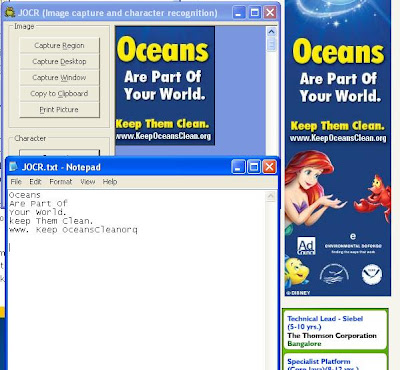
Have you ever encountered a situation whereby you would like to copy the text or character from image files or protected webpage but unable to do it? Instead of typing the text manually by referring to the image or protected webpage, now with this simple yet powerful software utility named as JOCR, it allows users to copy text from any image files or protected webpage by utilizing OCR (Optical Character Recognition) technology so that it can be turned into useful character for further processing.

JOCR is a freeware and is pretty easy to use. In order to copy text from any image or protected webpage, you must use JOCR to capture the image or webpage. The image captured will be displayed immediately on the JOCR screen, then you can click on ‘Recognizer’ button to copy the text from the image file. Some of the text supported by JOCR include Chinese, Czech, Danish, Dutch, English, Finnish, French, German, Greek, Hungarian, Italian, Japanese, Korean, Norwegian, Polish, Portuguese, Russian, Spanish, Swedish and Turkish.

The minimum pre-requisite of JOCR is Microsoft Office 2003 or higher version, and you must have Microsoft Office Document Imaging (MODI) installed in order for it to work correctly. If you think JOCR is useful, do get a free download here.
Read More..

Thursday, June 23, 2016

The Computer Science Pipeline and Diversity Part 1 How did we get here


(Cross-posted on the Google for Education Blog)

For many years, the Computer Science industry has struggled with a pipeline problem. Since 2009, when the number of undergraduate computer science (CS) graduates hit a low mark, there have been many efforts to increase the supply to meet an ever-increasing demand. Despite these efforts, the projected demand over the next seven years is significant.
Source: 2013 Taulbee Survey, Computing Research Association
Even if we are able to sustain a positive growth in graduation rates over the next 7 years, we will only fill 30-40% of the available jobs.

“By 2022, the computer and mathematical occupations group is expected to yield more than 1.3 million job openings. However, unlike in most occupational groups, more job openings will stem from growth than from the need to replace workers who change occupations or leave the labor force.” -Bureau of Labor Statistics Occupational Projection Report, 2012.

More than 3 in 4 of these 1.3M jobs will require at least a Bachelor’s degree in CS or an Information Technology (IT) area. With our current production of only 16,000 CS undergraduates per year, we are way off the mark. Furthermore, within this too-small pipeline of CS graduates, is an even smaller supply of diverse - women and underrepresented minority (URM) - students. In 2013, only 14% of graduates were women and 20% URM. Why is this lack of representation important?
  • The workforce that creates technology should be representative of the people who use it, or there will be an inherent bias in design and interfaces.
  • If we get women and URMs involved, we will fill more than 30-40% of the projected jobs over the next 7 years.
  • Getting more women and URMs to choose computing occupations will reduce social inequity, since computing occupations are among the fastest-growing and pay the most.
Why are so few students interested in pursuing computing as a career, particularly women and URMs? How did we get here?

One fundamental reason is the lack of STEM (Science, Technology, Engineering and Mathematics) capabilities in our younger students. Over the last several years, international comparisons of K12 students’ performance in science and mathematics place the U.S. in the middle of the ranking or lower. On the National Assessment of Educational Progress, less than one-third of U.S. eighth graders show proficiency in science and mathematics. Lack of proficiency has led to lack of engagement in technical degree programs, which include CS and IT.

“In the United States, about 4% of all bachelor’s degrees awarded in 2008 were in engineering. This compares with about 19% throughout Asia and 31% in China specifically. In computer sciences, the number of bachelor’s and master’s degrees awarded decreased sharply from 2004 to 2007.”  -NSF: Higher Education in Science and Engineering.

The lack of proficiency has had a substantial impact on the overall number of students pursuing technical careers, but there have also been shifts resulting from trends and events in the technology sector that compound the issue. For example, we saw an increase in CS graduates from 1997 to the early 2000’s which reflected the growth of the dot-com bubble. Students, seeing the financial opportunities, moved increasingly toward technical degree programs. This continued until the collapse, after which a steady decrease occurred, perhaps as a result of disillusionment or caution.

Importantly, there are additional factors that are minimizing the diversity of individuals, particularly women, pursuing these fields. It’s important to note that there are no biological or cognitive reasons that justify a gender disparity in individuals participating in computing (Hyde 2006). With similar training and experience, women perform just as well as men in computer-related activities (Margolis 2003). But there can be important differences in reinforced predilections and interests during childhood that affect the diversity of those choosing to pursue computer science .

In general, most young boys build and explore; play with blocks, trains, etc.; and engage in activity and movement. For a typical boy, a computer can be the ultimate toy that allows him to pursue his interests, and this can develop into an intense passion early on. Many girls like to build, play with blocks, etc. too. For the most part, however, girls tend to prefer social interaction. Most girls develop an interest in computing later through social media and YouTubers, girl-focused games, or through math, science and computing courses. They typically do not develop the intense interest in computing at an early age like some boys do – they may never experience that level of interest (Margolis 2003).

Thus, some boys come into computing knowing more than girls because they have been doing it longer. This can cause many girls to lose confidence and drive during adolescence with the perception that technology is a man’s world - Both girls and boys perceive computing to be a largely masculine field (Mercier 2006). Furthermore, there are few role models at home, school or in the media changing the perception that computing is just not for girls. This overall lack of support and encouragement keeps many girls from considering computing as a career. (Google white paper 2014)

In addition, many teachers are oblivious to or support the gender stereotypes by assigning problems and projects that are oriented more toward boys, or are not of interest to girls. This lack of relevant curriculum is important. Many women who have pursued technology as a career cite relevant courses as critical to their decision (Liston 2008).

While gender differences exist with URM groups as well, there are compelling additional factors that affect them. Jane Margolis, a senior researcher at UCLA, did a study in 2000 resulting in the book Stuck in the Shallow End. She and her research group studied three very different high schools in Los Angeles, with different student demographics. The results of the study show that across all three schools, minority students do not get the same opportunities. While all of the students have access to basic technology courses (word processor, spreadsheet skills, etc.), advanced CS courses are typically only made available to students who, because of opportunities they already have outside school, need it less. Additionally, the best and most enthusiastic minority students can be effectively discouraged because of systemic and structural issues, and belief systems of teachers and administrators. The result is a small, mostly homogeneous group of students have all the opportunities and are introduced to CS, while the rest are relegated to the “shallow end of computing skills”, which perpetuates inequities and keeps minority students from pursuing computing careers.

These are some of the reasons why the pipeline for technical talent is so small and why the diversity pipeline is even smaller. Over the last two years, however, we are starting to see some positive signs.
  • Many students are becoming more aware of the relevance and accessibility of coding through campaigns such as Hour of Code and Made with Code.
  • This increase in awareness has helped to produce a steady increase in CS and IT graduates, and there’s every indication this growth will continue.
  • More opportunities to participate in CS-related activities are becoming available for girls and URMs, such as CS First, Technovation, Girls who Code, Black Girls Code, #YesWeCode, etc.
There’s much more that can be done to reinforce these positive trends, and to get more students of all types to pursue computing as a career. This is important not only to high tech, but is critical for our nation to compete globally. In the next post of this series, we will explore some of the positive steps that have been taken in increasing the diversity of graduates in Computer Science (CS) and Information Technology (IT) fields.
Read More..

Saturday, June 18, 2016

Ever wondered how Amazon makes money

Amazon often seems to sell things so cheaply that we often wonder how they can possibly make on profit on that. Is it just because of the massive volume of sales. This article on the Andreessen Horowitz blog drills down into some detail precisely how Amazons business model actually works - its complicated. This article was brought to my attention by my colleague Mark Wilson.

from The Universal Machine http://universal-machine.blogspot.com/

IFTTT

Put the internet to work for you.

Turn off or edit this Recipe

Read More..

Thursday, June 16, 2016

How to delete all your computer Virus for free

Read More..
 
Copyright 2009 Information Blog
Powered By Blogger